
Home battery and energy apps
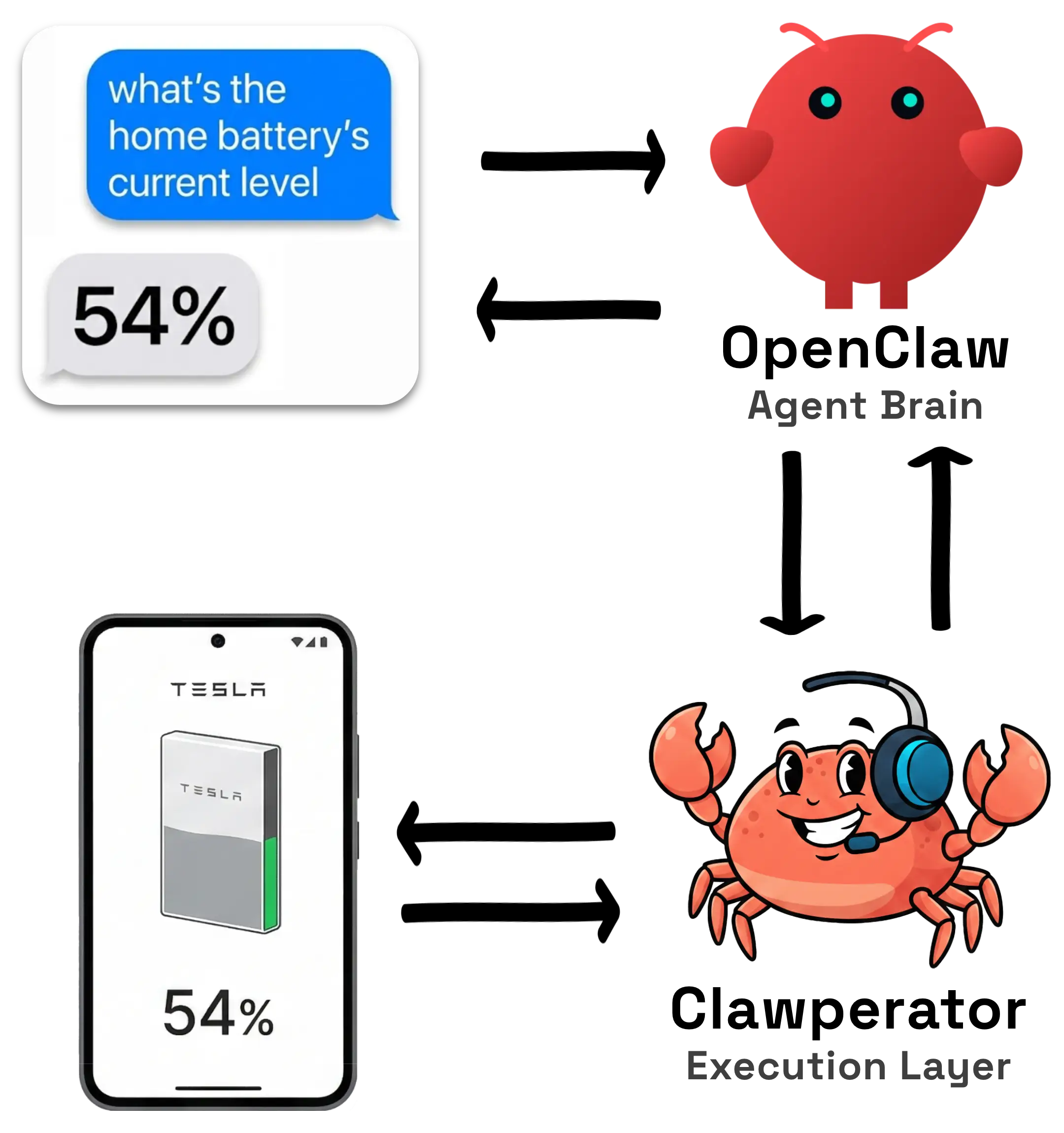
Read Powerwall, battery, or inverter status from mobile-only apps and trigger actions when thresholds are crossed.
Many services don't have APIs…
But they do have apps!
Clawperator
Clawperator gives agents direct control of real Android apps.
Clawperator is a deterministic execution layer that lets agents run skills on real Android apps to read data and take action on behalf of users.
Keep using your iPhone. Use a dedicated Android "burner" device, or let Clawperator create a Google Play-equipped emulator that runs all your apps.
Your OpenClaw/agent is the brain.
Clawperator is the hand.
Repeatable app flows become skills, so automations can be packaged and run again.
Automate any Android app. No API required.
Clawperator is most useful where the real interface only exists in a mobile app.
Read Powerwall, battery, or inverter status from mobile-only apps and trigger actions when thresholds are crossed.
Check temperature, switch device state, and turn heating or cooling on without waiting for a public API that may never exist.
Monitor a noisy school app, filter the clutter, and surface only the updates that actually matter.
Check Life360-style apps and send updates or screenshots until someone gets home, then stop automatically.
Build private workflows around grocery, courier, or account apps that only really exist as mobile interfaces.
Pull statuses, balances, or alerts from user-installed Android apps that do not expose a usable public API.
One command installs the CLI, fetches the latest Clawperator Operator Android app, verifies it, and helps prepare an Android device for your agent.
Tell your agent to:
Read https://clawperator.com/skill.md and get me set up with Clawperator.# Install Clawperator on macOS/Linux
curl -fsSL https://clawperator.com/install.sh | bashNo Android device handy? Have Clawperator create a Google Play equipped Android emulator.
clawperator emulator provisionClawperator has comprehensive documentation, setup guides, and API references at docs.clawperator.com.
For agents
Prefer the technical docs over this overview page. Start with the Node API guide, the Operator LLM playbook, or the machine-oriented markdown landing page.
More than UI automation. Each command does one thing, returns one result, and never hides retries.
Example agent loop (see docs.clawperator.com for the full API)
##
## Runtime skill path:
##

clawperator skills run <hvac-app>.set-power -- --climate-state on --unit-name "Living room"

##
## Or, agent-driven control path:
##

clawperator open --app <hvac-app>

clawperator snapshot    # Get the current UI state as structured JSON.
# { "ui_tree": [...] }

# 🧠 agent: Inspect the snapshot, determine commands to run next.

clawperator click --text "Climate"
clawperator scroll-and-click --text-contains "Living room"

clawperator read --id ":id/power_state"
# { "text": "Off" }

# 🧠 agent: Power is off; target climate state is on.

clawperator click --id ":id/power_button"Each command does one thing, returns one result, and never hides retries.
Agents get machine-readable UI state, explicit errors, and results they can branch on.
Clawperator is designed for reasoning systems that need predictable execution, not best-effort automation.
Clawperator automations are unlocked through skills.
Clawperator includes an open source, ever-expanding skills repository for common Android workflows.
But you are not blocked waiting for an official skill. Agents do not need a prebuilt skill to automate your apps.
Our dedicated build-your-own-skill-from-scratch documentation walks agents through the process step by step. Point your agent at the right app and tell it to make a skill. It can use the clawperator API to inspect the app's UI, find a reliable path to the state or action you need, and create a private, personalized skill for your exact workflow.
You are not blocked waiting for a public skill. Start with included skills, adapt them to your setup, or let your agent create private ones through Clawperator's documented API.
Your agent is the brain. Clawperator is the hand. Skills sit above the runtime as reusable app-specific workflows. Whether the agent runs a skill or drives the UI step by step, Clawperator is the execution layer that talks to the Android device and returns structured results.
AI Agent / LLM
Clawperator
Android Device
Mobile Apps
The runtime includes the CLI on your host machine and the Clawperator Operator Android app on the Android device. The agent decides what to do next. Skills give the agent reusable ways to handle app-specific workflows it already understands, whether those come from the open source skills repository or from private skills the agent created for you. Clawperator executes the Android side of the workflow and returns data your agent can use.
The operating loop is simple: observe, decide, execute, return.
01
Capture the current Android UI as structured state so the agent can reason on a real snapshot of the app.
02
The agent chooses the next action or runs a skill. Clawperator does not plan, improvise, or decide on its own.
03
Clawperator performs the requested tap, type, scroll, read, or app action on the connected Android device.
04
Return one machine-readable result so the agent can continue, recover, or stop with confidence.
Yes. Clawperator does not require you to switch your primary phone to Android. The normal setup is to keep using your iPhone and connect your agent to a separate Android burner phone or a local Android emulator.
Yes. Clawperator can provision a local Google Play-equipped Android emulator. That is useful for getting started, local development, and many automation flows.
A cheap dedicated burner phone is the preferred setup for compatibility and long-running reliability, but it is not the only option. A local Android emulator is available when you do not have a device handy.
That is fine. Clawperator includes a growing open source skills library, but you are not blocked on prebuilt skills. Your agent can use Clawperator's structured, documented API to explore an app, operate it, and build a private skill for your own workflow.
No. The agent decides what to do next. Clawperator executes validated Android actions and returns structured results.